
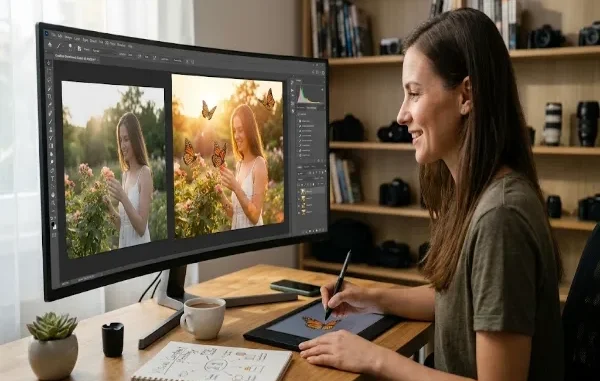
Visual content has become an essential part of online communication. From social media posts and personal blogs to marketing campaigns and digital presentations, images help people communicate ideas quickly and make content more memorable. However, creating an effective image involves more than taking a photograph. Small creative adjustments can transform an ordinary picture into something that better reflects a message, mood, or story.
Modern photo editing tools make these adjustments more accessible to beginners and experienced creators alike. Features that once required advanced editing skills can now be completed with simpler workflows, allowing people to experiment with visual ideas without spending hours learning complex software.

Why Creative Details Matter in Photography
A strong photograph usually has a clear subject, balanced composition, and lighting that supports the intended message. Yet even a technically good image may benefit from additional creative elements. A travel photograph, for example, can become more expressive with subtle decorative details, while a birthday picture may feel more personal when customized with themed graphics.
These additions should serve a purpose rather than simply fill empty space. When used thoughtfully, colors, illustrations, textures, and other visual elements can guide attention toward the main subject and help establish the mood of an image.
The goal is not to make every photograph look complicated. Sometimes a small adjustment is enough to make a picture more distinctive while preserving its original character.
How Digital Tools Expand Creative Possibilities
Traditional photo editing often involves several steps, including cropping, color correction, object selection, and layering. Although these techniques provide considerable control, they can take time to learn and apply consistently.
Modern editing tools simplify many of these tasks through guided interfaces and automated features. Users can adjust brightness, remove unwanted objects, add decorative elements, or combine different visual components without necessarily understanding every technical detail behind the process.
This accessibility encourages experimentation. A creator can test different styles, compare several versions of an image, and decide which result best communicates the intended idea. The most useful tools are those that make creative decisions easier without limiting the user’s control over the final design.
Adding Decorative Elements Without Losing Focus

Decorative graphics can help turn a simple photograph into a more expressive visual. Butterflies, flowers, stars, and other illustrations are often used in personal photography, greeting cards, invitations, and social media designs. Their effectiveness depends on how naturally they fit into the image.
For example, a butterfly graphic may complement a garden photograph or add a playful detail to a portrait. Creators exploring ways to add butterfly to photo can use this type of editing approach to experiment with placement and visual style while keeping the original subject at the center of attention.
Match the Element to the Image
Before adding a graphic, consider the photograph’s purpose and existing visual style. A realistic outdoor image may work well with a subtle butterfly illustration, whereas a colorful greeting card might support a more artistic design.
The added element should feel connected to the image rather than appearing randomly placed. Matching the overall theme helps maintain visual consistency.
Pay Attention to Size and Placement
Scale and positioning can significantly influence the final result. A decorative element that is too large may distract from the subject, while one that is too small may go unnoticed.
Try placing the graphic near an area of natural visual interest, leaving enough space around the main subject. Experimenting with several positions before finalizing the design can help create a more balanced composition.
Maintain Consistent Lighting and Color

When an added element looks noticeably different from the photograph, the composition can feel artificial. Color, contrast, brightness, and visual style all affect how well separate elements work together.
For realistic results, choose graphics that complement the image’s lighting and color palette. For deliberately artistic designs, a contrasting style can also work, provided the difference appears intentional.
The Role of AI in Everyday Photo Editing
Artificial intelligence is changing how people approach common editing tasks. Depending on the tool, AI-assisted features may help identify subjects, remove backgrounds, generate visual elements, or suggest adjustments based on an image’s content.
These capabilities can reduce the time needed for routine work and give users more opportunities to explore creative options. Someone preparing a series of social media graphics, for instance, may be able to test different visual treatments more quickly than with a fully manual process.
However, automated suggestions are not always accurate. An AI-generated element may have unusual proportions, inconsistent lighting, or details that do not fit the original photograph. Human review remains important, especially when the image represents a business, product, or real event.
AI is most useful when it supports the creator’s intention rather than making every design decision automatically.
Practical Tips for Creating Better Edited Images
A few simple habits can improve the quality of edited photographs and make the process more efficient.
Start with a good original image. Clear photographs with suitable lighting generally provide a stronger foundation for editing. While creative effects can improve an image, they cannot always compensate for poor focus or missing details.
Keep the main subject recognizable. Decorative elements should support the photograph rather than overwhelm it. Viewers should still understand what the image is intended to communicate.
Experiment with restraint. Adding several effects at once can make a design feel crowded. Begin with one or two changes, review the result, and introduce additional elements only when they improve the composition.
Save an original copy. Keeping the unedited photograph makes it easier to revisit earlier versions or create alternative designs later. This is particularly useful when producing content for multiple platforms.
Check the final image at different sizes. A design that looks attractive on a large monitor may appear cluttered on a mobile screen. Reviewing the image at its intended display size can reveal problems with readability, placement, and visual balance.
Using Edited Images Across Different Platforms

The same image may serve different purposes depending on where it appears. A social media post might need bold colors and a square composition, while a blog illustration may benefit from a wider layout that fits the surrounding text.
Creators should consider dimensions, file formats, and image quality before publishing. JPEG is commonly suitable for photographs with solid backgrounds, while PNG is useful when transparency needs to be preserved. Other formats may be appropriate depending on platform support and performance requirements.
It is also important to respect copyright and privacy. Use images and graphics that you own, have permission to edit, or are licensed for the intended purpose. When photographs include identifiable people, consider their consent and the context in which the edited image will be shared.
These practical considerations help ensure that creative editing produces content that is both visually appealing and appropriate for its audience.
Conclusion
Creative photo editing gives people more ways to communicate ideas through images. Small decorative additions, thoughtful color adjustments, and accessible digital tools can make photographs more expressive without requiring advanced technical knowledge.
The best results come from balancing experimentation with careful visual judgment. By choosing suitable elements, maintaining a clear focal point, and reviewing the finished composition, creators can produce engaging images that preserve the original subject while adding their own creative perspective.
Related posts:
 How Dechecker AI Checker Turns Awkward Drafts Into Human-Readable Content
 The Complete Guide to Using Telegram for Secure and Smart Communication
 The Chemistry Behind Firefighting Foam: How Surfactants Make Fire Suppression Work
 Dell Latitude 5540 Performance Tested: Can It Handle Your Workflow?
 Best Traction Tools for Lifted Jeeps & SUVs on the Trail
Leave a Reply