
Libero Mail is a free email service operated by Italiaonline S.p.A., one of Italy’s largest internet companies. Launched in 1999, it provides webmail, mobile apps, IMAP/POP3 access, and certified electronic mail (PEC) services for millions of Italian users.
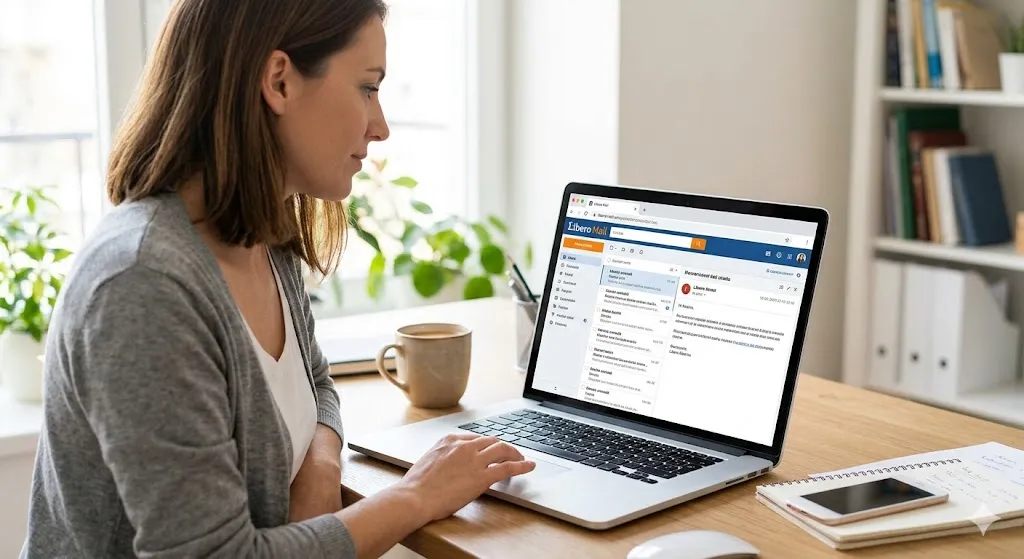
Libero Mail: Everything You Need to Know
History, features, IMAP/SMTP settings, pricing, PEC, real user problems, honest verdict — one place, no fluff.
Libero Mail is one of the oldest and most widely used email services in Italy, with roots going back to 1999. If you are Italian, you almost certainly have encountered a @libero.it address — on a business card, in a form field, or in your own inbox. Yet for a service this established, genuinely useful and complete English-language guides are surprisingly rare. This article fixes that.
Whether you are setting up Libero Mail for the first time, troubleshooting IMAP errors in Outlook or Thunderbird, trying to understand the difference between the free service and the paid plans, or evaluating whether Libero’s certified mail (PEC) service is right for your needs — this guide covers all of it honestly, including the problems that other articles skip.
Libero Mail is operated by Italiaonline S.p.A., one of Italy’s largest digital companies, which also operates Virgilio, PagineGialle, PagineBianche, and several other major Italian web properties. Understanding this context matters: Libero is not a startup or a niche product. It is institutional Italian internet infrastructure, with all the strengths and limitations that implies.
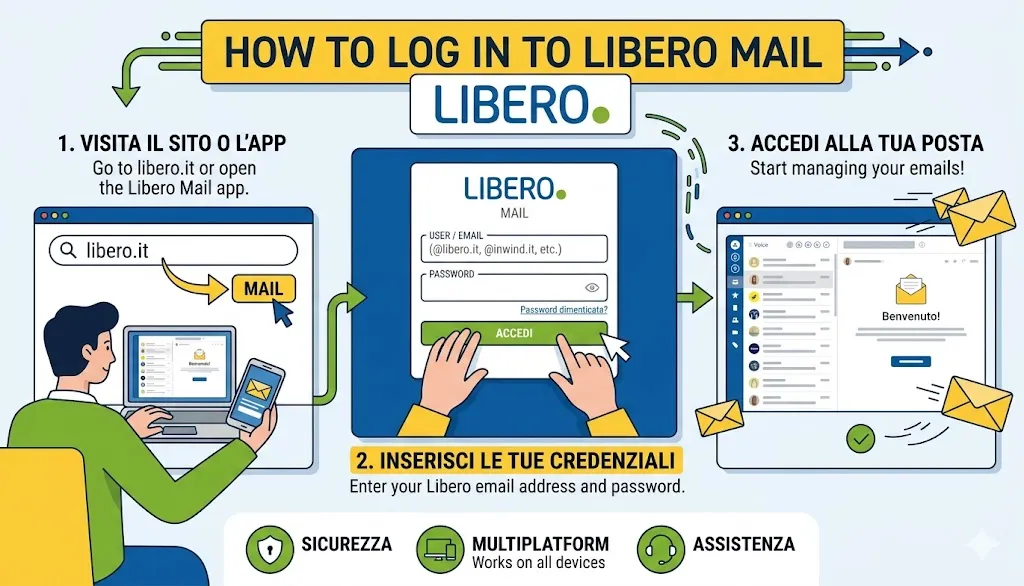
How to Log In to Libero Mail
- Visit the official login page.
- Enter your email address and password.
- Complete two-step verification if enabled.
- Access your inbox through webmail or a configured email client.
Libero Mail History: From 1999 to Today
Libero Mail launched in 1999 as part of the first wave of free web-based email services that followed Hotmail’s 1996 debut and Gmail’s absence. At the time, offering a free @libero.it email address was a significant proposition for Italian internet users who either had no email address or paid for one through their ISP. Libero rapidly became the dominant free email provider in Italy — a position it built on availability, reliability, and the simple fact that it was there first.
1999
Libero Mail launches as a free web-based email service in Italy. Basic features: inbox, sent folder, drafts, junk mail filter, and simple anti-spam. Rapid user adoption among Italian internet users gaining access for the first time.
2002
Major feature update. The login page is enriched with news feeds, events, horoscopes, and content from the Italiaonline network. Antivirus service added. Jumbo Mail service introduced for sending large files. The service begins evolving from simple email toward a wider web portal.
2006
Drag-and-drop email management introduced. Users can drag messages between folders and to connected mailboxes. A significant usability improvement that reflected the broader shift toward Ajax-powered web interfaces happening across the industry.
2008–2012
i-mode compatibility added for early mobile users. Smartphone app development begins. Two-step authentication introduced as a security layer. Drive storage space offered to users. Libero begins the gradual transition from desktop-first to multi-device service.
2015
Italiaonline S.p.A. is formed through the merger of Italiaonline and Matrix S.p.A., consolidating Libero, Virgilio, PagineGialle, and other major Italian digital properties under a single company. Libero Mail becomes part of a larger integrated digital ecosystem.
2019–2023
Mobile app versions updated for iOS and Android. Premium product lineup expanded: Mail Plus, Mail Personal, Mail Business, PEC, and Libero Drive. Growing service reliability issues documented in user reviews — a pattern of outages and IMAP instability that begins to affect reputation.
2026
Latest Android app version 50.8.5 released February 2026. PEC service being updated for European REM (Registered Electronic Mail) standard compliance, required before end of 2026. Libero Mail continues as Italy’s established free email provider while competition from Gmail and Outlook has significantly intensified.
The historical context matters for understanding Libero Mail’s current position. It is not a service that was built to compete with Gmail in 2024 — it is a service that was built in 1999 and has evolved incrementally ever since. That evolution shows in both its strengths (deep integration with Italian digital infrastructure, PEC certification, large established user base) and its weaknesses (interface design that feels dated compared to modern alternatives, reliability issues, mobile app performance complaints).
What Libero Mail Actually Offers
Libero Mail covers the full range of standard email features plus several that are specific to the Italian digital context. Below is an honest breakdown of what you actually get.
Free Email Address
A free @libero.it address with webmail access. Multiple domains available including @libero.it, @inwind.it, @iol.it, and @blu.it.
Two-Step Authentication
Optional two-factor authentication (called “Password Sicura”) using a code sent to your mobile phone in addition to your standard password.
Security Filters
Built-in anti-spam, anti-phishing, anti-virus, and anti-malware filters on all accounts. Automatic filtering without user configuration required.
Mobile Apps
Dedicated apps for iOS and Android. The app also supports adding email accounts from other providers — Gmail, Yahoo, Outlook — in a unified inbox.
Libero Drive
Cloud storage for documents, photos, and video accessible from all devices. Free tier includes limited space; premium plans offer up to 1 TB.
Home Widget Dashboard
Customizable dashboard with news, weather, horoscopes, and other content from the Italiaonline portal. Useful for Italian-language content discovery.
IMAP / POP3 Support
Full IMAP and POP3 support allows Libero Mail to be used with Outlook, Thunderbird, Apple Mail, and any other standard desktop or mobile email client.
Folder Management
Create custom folders, set automatic sorting rules, drag and drop between folders. Standard email organization tools available in the webmail interface.
Large File Sending
Jumbo Mail service for sending files larger than standard attachment limits. Files are uploaded to storage and sent as download links rather than direct attachments.
Feature Note
What Libero Mail Does Not Offer (Yet)
Unlike Gmail and Outlook, Libero Mail does not offer a native scheduled send feature within the webmail interface. IMAP access via third-party clients like Mailbird does support scheduled sending. There is also no native AI-powered email assistant, no smart inbox categorization comparable to Gmail’s tabs, and no built-in video calling integration. For users whose workflow depends on these features, this is a meaningful limitation.
How to Create a Libero Mail Account
Creating a Libero Mail account is straightforward and takes approximately three to five minutes. The registration page is available in Italian by default but the process is simple enough to follow without fluency in the language.
Step-by-Step Registration
Step 1 — Visit the registration page. Go to liberomail.libero.it and click the registration or sign-up option. You will be directed to a form requesting basic personal information.
Step 2 — Choose your email address. Select your preferred username and domain. Available domain options include @libero.it, @inwind.it, @iol.it, @blu.it, and @giallo.it. The system will indicate whether your chosen address is available.
Step 3 — Set a strong password. Libero recommends using their two-step authentication (Password Sicura) from setup. This adds a verification code sent to your mobile number in addition to your password.
Step 4 — Provide a recovery contact. A recovery email address or mobile phone number is required. This is the only way to recover access if you forget your password, so use a contact you reliably have access to.
Step 5 — Verify your identity. For standard free accounts, verification is completed via a code sent to your recovery contact. For PEC accounts, identity verification requires SPID, CIE (Italian electronic ID card), or a paid video recognition process.
Important
Account Deactivation Due to Inactivity
Libero Mail free accounts can be deactivated after extended periods of inactivity. If you create an account and then do not log in for a prolonged period, you risk losing the address permanently. Log in at minimum every few months to keep a free account active. Premium plans do not have this limitation.
Libero Mail IMAP, SMTP and POP3 Settings
This is the section most users arrive searching for, and most articles get it wrong or present it without context. Here are the correct and current settings for configuring Libero Mail in any external email client — Outlook, Thunderbird, Apple Mail, Mailbird, or any other standard application.
IMAP Settings (Recommended)
IMAP is the recommended protocol for most users. It synchronizes your inbox across all devices — changes made on one device (reading, deleting, moving messages) are reflected on all others. This is the correct choice if you access your email from more than one device.
| Server | imapmail.libero.it |
|---|---|
| Port | 993 SSL/TLS enabled |
| Encryption | SSL / TLS |
| Authentication | Normal password |
| Username | Full email address e.g., yourname@libero.it |
| Server | smtp.libero.it |
|---|---|
| Port (Primary) | 465 SSL/TLS — recommended |
| Port (Alternative) | 587 STARTTLS — use if 465 fails |
| Encryption | SSL/TLS or STARTTLS |
| Authentication | Required — Normal password |
| Username | Full email address Warning: Never enter just the username portion. |
| Server | popmail.libero.it |
|---|---|
| Port | 995 SSL/TLS enabled |
| Encryption | SSL / TLS |
| Username | Full email address |
Common Setup Mistake
Always Use Your Full Email Address as the Username
The single most common cause of authentication failure when setting up Libero Mail in Outlook, Thunderbird, or Apple Mail is entering only the username portion (e.g. yourname) rather than the complete email address (yourname@libero.it). Always enter the full address in both the username and email fields. This applies to both IMAP and SMTP configuration.
Two-Step Authentication and IMAP
If you have enabled Libero’s two-step authentication (Password Sicura), some older email clients may experience authentication failures when connecting via IMAP. This occurs because these clients do not support the additional verification step. In these cases, Libero provides the option to generate an application-specific password for use with external clients — check the security settings section of your Libero account to generate one if needed.
Libero Mail Mobile App: iOS and Android
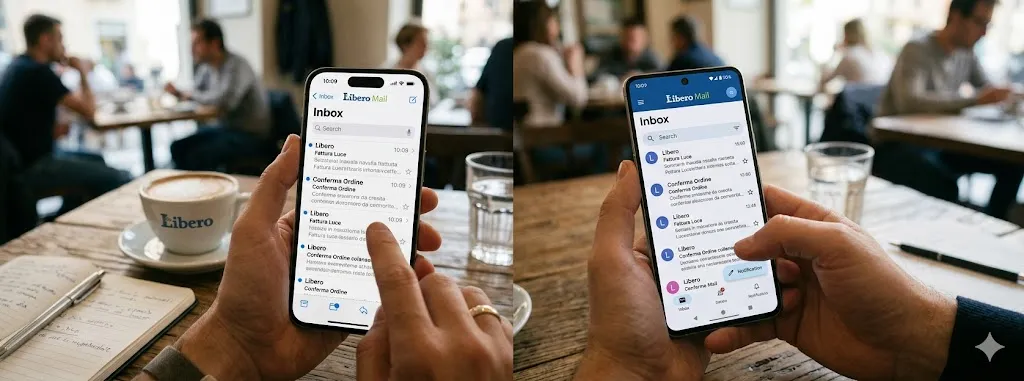
The Libero Mail mobile app is available on both iOS and Android and offers a feature set that goes beyond what you might expect from a webmail companion app. The current Android version as of early 2026 is 50.8.5. The iOS app is available on the App Store published by Italiaonline S.p.A.
What the App Does Well
The app’s most useful feature is its support for multiple email accounts from any provider. You do not need a Libero email address to use the Libero Mail app — you can add Gmail, Yahoo, Outlook, and other accounts alongside a Libero account and manage them in a single unified inbox. This positions it as a general-purpose email client rather than just a Libero account manager.
Other genuine strengths include color-coded account differentiation (each account gets a distinct color for easy visual identification), PIN lock with configurable timeout (lock after closing or after a set number of minutes), and the ability to set a display name different from your account name for outgoing messages.
What the App Does Poorly
User reviews across both the App Store and Google Play consistently identify the same problems. Performance is the primary complaint — the app is frequently described as slow to load (5–10 seconds on modern hardware), prone to hanging when loading message data, and occasionally requiring a restart to function correctly. A widely reported issue involves the app logging users out unexpectedly and failing to accept valid credentials until a device restart or cache clear.
Spam filtering in the app has also drawn consistent criticism. Users report that emails manually marked as spam reappear as normal messages after the app is closed and reopened, suggesting the spam status is not properly synchronized with the server.
Mobile App Strengths
- Supports any email provider, not just Libero accounts
- Unified inbox across multiple accounts
- Color-coded account differentiation
- Configurable PIN lock for security
- Custom display name per account
- Free to use with no subscription required
Mobile App Weaknesses
- Consistently reported slow load times
- Occasional unexpected logouts
- Spam filter settings not properly persisted
- Interface feels dated compared to Gmail or Outlook apps
- No scheduled send in the mobile interface
- Customer support slow to respond to reported issues
“It used to be a great app and because of it I subscribed to the premium version, but after the update I already unsubscribed.”— App Store user review, 2023
The honest assessment of the mobile app is that it works adequately for basic email use but has reliability problems that have persisted across multiple update cycles without resolution. If mobile email performance is important to you, managing your Libero account through a third-party client like Outlook Mobile, Spark, or Apple Mail via IMAP may produce a more reliable experience than the native Libero app.
Libero Mail Pricing: Free vs Premium Plans
Libero Mail operates on a freemium model. The free tier is genuinely usable for basic email; the premium tiers add storage, remove advertising, provide professional features, and unlock priority customer support.
Free — €0 Always free. Includes a standard @libero.it address, basic storage, anti-spam and antivirus filtering, IMAP and POP3 access, and mobile app support. Advertising is displayed throughout the interface and support is standard only.
Mail Plus Zero — €12,99 / year (VAT included) The entry-level paid plan. Removes all advertising from your inbox permanently, but does not increase your storage beyond the current free allocation. Automatic renewal unless cancelled. A free one-month trial is available with no purchase obligation — the most risk-free way to test the ad-free experience before committing.
Mail Plus 5 GB — €24,99 / year (VAT included) The most popular paid plan according to Libero’s own website. Removes advertising and upgrades total mailbox storage to 5 GB. Includes priority customer support with chat access. Automatic renewal unless cancelled.
Mail Plus 1 TB — €59,99 / year (VAT included) The top-tier storage plan. Removes advertising and provides 1 TB of mailbox storage — suitable for users who store large volumes of email and attachments over many years. Includes priority support. Automatic renewal unless cancelled.
Bundle Options Libero also offers discounted bundles combining Mail Plus with other products. Mail Plus combined with a PEC account starts from €19,99 per year (VAT included), saving at least €9,60 compared to purchasing separately. Mail Plus combined with Libero Drive (cloud storage) starts from €16,99 per year. Mail Plus combined with Libero Docs (online documents, spreadsheets, and presentations) starts from €13,99 per year. Bundle promotional pricing applies to the first year of subscription.
Is the Premium Plan Worth It? For users who find advertising in their inbox disruptive, Mail Plus Zero at €12,99 per year is a very modest investment — roughly €1 per month. For users who store significant email history or large attachments, the 5 GB plan at €24,99 is the most practical step up. The 1 TB plan is difficult to justify unless you have a specific high-volume storage need. The bundle options represent genuine savings if you were already considering PEC or cloud storage alongside your email upgrade.
All prices are as published on mailplus.libero.it as of May 2026, VAT included.
Pricing Note
Check Current Prices Directly on Libero’s Website
Libero’s premium pricing changes periodically and varies by promotional period. The tiers described above are accurate as of mid-2026 but exact figures should be verified at premium.libero.it before making a purchase decision. Mail Plus Zero offers a free one-month trial with no purchase obligation — worth trying before committing to annual billing.
Is the Premium Plan Worth It?
For users who rely on Libero Mail as their primary email address and want to remove advertising while gaining significantly more storage, Mail Plus is a reasonable investment at its price point. The 1 TB storage upgrade alone justifies the cost for users who store a large volume of email or attachments. Priority support becomes genuinely valuable if you experience the service reliability issues documented in user reviews — standard support response times from Libero are reported as slow.
For professional use, Mail Personal or Mail Business provide the custom domain capability that makes a Libero-hosted email address look professional rather than personal. The @libero.it domain signals a personal account to business contacts; a custom domain does not.
Libero Mail PEC: Certified Electronic Mail Explained
PEC — Posta Elettronica Certificata — is a uniquely Italian and European concept that has no direct equivalent in most English-speaking countries. Understanding it is important for anyone operating within the Italian administrative, legal, or business context.
What PEC Is
PEC is a form of certified email that carries the same legal value as a registered letter with return receipt (raccomandata con ricevuta di ritorno) under Italian law. When you send a message via PEC, the system generates two receipts: an acceptance receipt confirming the message was accepted into the system, and a delivery receipt confirming it was delivered to the recipient’s inbox. These receipts are legally binding documents that can be used as evidence in court.
PEC is certified by the Agenzia per l’Italia Digitale (AgID) — the Italian government’s digital agency — which maintains the registry of accredited PEC providers. Libero Mail PEC is on this registry, meaning its certified mail is legally recognized by Italian public administration, courts, and regulatory bodies.
Who Needs PEC in Italy
PEC is not optional for several categories of Italian entities. Companies and VAT holders (Partite IVA) are legally required to have a PEC address registered with the Italian Companies Register (Registro Imprese). Professionals registered in professional orders (lawyers, accountants, doctors, engineers, etc.) are also required by law to have an active PEC address. For private citizens, PEC is not mandatory but is increasingly useful for communicating with public administration, submitting tax documents, and conducting official correspondence without physical presence.
Key Advantage
PEC as a Legal Tool
The practical benefit of PEC for individuals and businesses is the elimination of certified postal mail for official correspondence. Instead of going to a post office, paying for a registered letter, and waiting for physical delivery, you send a PEC email from your device and receive a legally binding delivery receipt within minutes. For active businesses communicating regularly with government bodies, courts, or other PEC holders, the time and cost savings are substantial.
Libero Mail PEC Plans and Pricing
Libero offers PEC accounts under its premium product umbrella. The standard entry plan includes 1 GB of storage, no limits on sending and receiving, automatic renewal, and is positioned for private individuals. Business-tier plans offer more storage and additional features for professional and corporate use.
Identity verification is required before a PEC account can be activated, as mandated by Italian law. Verification can be completed via SPID (Italy’s digital identity system), CIE (electronic identity card), or a paid video recognition process. The video recognition option costs €24.99 and allows up to two attempts.
The European PEC Transition (REM Standard)
Italian PEC is currently being upgraded to comply with the European REM (Registered Electronic Mail) standard, which will allow certified email to carry legal weight across EU member states — not just within Italy. The transition is expected to be completed by the end of 2026. Libero is actively updating its PEC service to REM compliance, and users can begin the compliance process now through their PEC account settings. This involves confirming identity through online recognition and enabling two-step verification on the PEC mailbox.
This European standardization is a significant development: it means a Libero PEC address will eventually function as a legally recognized communication method across the entire EU, not just domestically. For Italian businesses operating internationally within Europe, this upgrade materially increases the utility of PEC.
Common Libero Mail Problems and How to Fix Them
Libero Mail has a documented history of reliability issues that are worth addressing honestly. User reviews on Trustpilot describe repeated service outages, daily errors on paid accounts, and poor customer support responsiveness. Understanding the most common problems and their solutions prevents a great deal of frustration.
Problem 1: IMAP Not Working in Outlook or Thunderbird
The most frequently reported technical problem with Libero Mail is IMAP failure in external email clients — either failing to connect at all, connecting but not syncing, or connecting and then losing connection intermittently.
Solution checklist: Verify you are using the complete email address as your username, not just the portion before the @ symbol. Confirm the server address is imapmail.libero.it on port 993 with SSL/TLS enabled. If you have two-step authentication active, generate an application-specific password from your Libero account security settings and use that instead of your normal password. If the ISP you are using blocks port 993, try alternative configurations — though this is uncommon with modern ISPs.
Problem 2: SMTP Authentication Errors When Sending
Sending failures via SMTP most commonly occur due to incorrect port configuration or using the username portion of the email address rather than the full address. Try port 465 with SSL/TLS first; if that fails, switch to port 587 with STARTTLS. In both cases, authentication must be enabled and the full email address used as the username.
Problem 3: Service Outages and Inbox Not Loading
Libero Mail has experienced multiple significant service outages. User reviews document blackouts lasting multiple days, with no service communication to affected users. When the Libero webmail interface fails to load or the inbox is inaccessible, the first step is to check aiuto.libero.it for any maintenance announcements. If no maintenance is scheduled, try clearing your browser cache and cookies, or switching to an alternative browser. Accessing the account via IMAP in a desktop client can sometimes work when the webmail interface is down.
Reliability Warning
Service Stability Has Been a Genuine Problem
Independent user reviews consistently document service outages affecting both free and paid Libero Mail accounts. One paying user described “two blackouts in six months, days without inbox service.” Another reported “errors on a daily basis” on a paid subscription with no explanation from Libero support. These are not isolated complaints — they represent a pattern that prospective users, particularly those who need email reliability for professional purposes, should factor into their decision. If you are a business user, consider whether Libero’s reliability track record meets your requirements before committing.
Problem 4: Mobile App Login Failures
A widely reported issue on Android involves the app logging users out and refusing to accept valid credentials. Credentials that work correctly on the Libero webmail interface fail in the mobile app. The most reliable fix is to clear the app’s cache and data in Android’s app settings, then log in fresh. In persistent cases, uninstalling and reinstalling the app resolves the issue. If the problem recurs, consider using a third-party email client with IMAP configuration instead of the native Libero app.
Problem 5: Antivirus or Firewall Blocking Access
Security software on Windows or macOS can interfere with Libero Mail access, both in the browser and in desktop email clients. If Libero works on one network but not another, or stops working after a security software update, temporarily disabling the firewall or antivirus to test is a reasonable diagnostic step. If this resolves the issue, add Libero’s domains and server addresses to your security software’s allowlist.
Problem 6: Browser Compatibility Issues
Libero Mail’s webmail interface works best on current versions of Chrome, Firefox, Safari, and Edge. Internet Explorer 11 is still technically supported but with reduced functionality unless compatibility mode is disabled. If the interface appears broken or features are missing, upgrading to a current browser version almost always resolves the issue. Clearing the browser cache after an upgrade is recommended.
How Libero Mail Performs Across Key Areas
Ease of Setup Creating a Libero Mail account and configuring it in an external client is straightforward. The registration process is quick, and IMAP settings are standard. The main friction point is the Italian-only interface, which adds a small barrier for non-Italian speakers.
Free Plan Value The free tier covers the basics competently — a working email address, anti-spam filtering, IMAP access, and mobile app support. The storage allowance is modest compared to Gmail’s 15 GB free tier, and advertising is present throughout the interface, but for casual personal use the free plan is adequate.
Service Reliability This is where Libero Mail’s record is most difficult to defend. Multiple documented outages affecting both free and paid accounts, daily errors reported by long-term subscribers, and slow communication during service disruptions have made reliability the brand’s most consistent weakness. Users who depend on email for professional communication should factor this in carefully before committing.
PEC / Certified Mail The strongest part of the Libero offering. PEC is legally certified by the Agenzia per l’Italia Digitale, generates legally binding delivery receipts, and is actively being updated for European REM standard compliance ahead of the 2026 deadline. For Italian users with compliance requirements, this is the feature that makes Libero genuinely useful in a way no international alternative can match.
Mobile App Quality The app handles multiple accounts from different providers in a unified inbox, which is genuinely useful. However, persistent performance complaints — slow load times, unexpected logouts, spam filters that reset on closing — have been present across multiple update cycles without resolution. For reliable mobile access, configuring Libero via IMAP in a third-party client produces better results than the native app.
IMAP / SMTP Support Full IMAP and POP3 support is available and works correctly when properly configured. The most common issues — authentication failures and sync problems — are almost always caused by configuration errors rather than server-side problems. The settings themselves are stable and well-documented.
Security Features Anti-spam, anti-phishing, anti-virus, and anti-malware filters are included on all accounts without configuration. Two-step authentication (Password Sicura) is available and recommended. Security at the infrastructure level is solid; the main security concern is account recovery difficulty if access to the registered mobile number is lost.
Customer Support Support response times are consistently reported as slow, with little proactive communication during outages. Premium plan holders receive priority support access, which improves the experience meaningfully — but standard account holders should expect limited assistance when problems arise. The self-help portal at aiuto.libero.it is reasonably comprehensive for common issues.
Italian Context Fit No other major email provider integrates as naturally into the Italian digital ecosystem. PEC certification, Italian public administration compatibility, Italiaonline content integration, and the familiarity of the @libero.it domain within Italy all contribute to a service that makes specific sense for Italian users in a way that Gmail and Outlook — despite being technically superior on most metrics — simply do not replicate.
How Libero Mail Compares to Alternatives
| Service | Free Storage | Reliability | PEC / Legal Mail | Mobile App | Best For |
|---|---|---|---|---|---|
| Libero Mail | Standard | Mixed | Yes | Average | Italian users, PEC needs |
| Gmail | 15 GB | Excellent | No | Excellent | General use, productivity |
| Outlook.com | 15 GB | Excellent | No | Excellent | Microsoft ecosystem users |
| ProtonMail | 1 GB | Very Good | No | Good | Privacy-first users |
| Virgilio Mail | Standard | Mixed | Yes (PEC) | Average | Alternative Italian free email |
| Aruba PEC | Paid only | Good | Yes — specialist | Good | PEC-first business users |
The comparison table makes Libero Mail’s positioning clear. Against global alternatives like Gmail and Outlook, Libero loses on storage size, reliability, mobile app quality, and feature breadth. It wins specifically on PEC availability and on the cultural and administrative fit for Italian users who need a service integrated into Italian digital infrastructure.
Within the Italian market, Libero’s most direct competitor is Virgilio Mail, also operated by Italiaonline S.p.A. — which means choosing between them is largely a matter of preferred domain address rather than a substantive service difference, as they share the same infrastructure. Aruba is the specialist choice for users whose primary need is PEC rather than general-purpose email.
For international users or for Italians who need reliable professional email, Gmail and Outlook remain the stronger choices on every metric except PEC availability. The practical solution for many Italian users is a dual-address approach: Gmail or Outlook for day-to-day email, and a Libero or Aruba PEC address for official certified correspondence.
Honest Verdict: Who Should Use Libero Mail?
Libero Mail Is Right For You If…
- You are Italian and need a PEC address for legal or administrative compliance
- You already have a long-established @libero.it address you want to keep
- You need a free Italian-language email portal with news and content integration
- You want certified mail at lower cost than physical registered post
- You are a business needing Italian regulatory compliance (PEC requirement)
- You want to try Mail Plus free for a month before committing
Consider Alternatives If…
- You need email you can depend on for daily professional communication
- Mobile email performance and app quality matter to you
- You want more than 15 GB of free storage
- Fast, responsive customer support is important
- You want AI-powered inbox features or smart categorization
- You are not in Italy and have no Italian legal or administrative needs
The honest verdict is that Libero Mail occupies a specific and legitimate niche: it is the established Italian email service, with the deepest integration into Italian digital infrastructure, the only major free provider offering PEC alongside standard email, and a legitimate choice for any Italian user whose compliance requirements make PEC necessary. Outside that context, its reliability record and mobile app quality make it hard to recommend over Gmail or Outlook for general use.
For the millions of existing Libero Mail users, the service is likely good enough to continue using for personal email, particularly if the free tier meets your storage needs and you access it primarily via webmail. If you rely on it for professional communication, a premium plan with the priority support upgrade is worth the cost — not because the product is superior but because the support access matters when outages occur.
Final Verdict
The right choice for Italian users with PEC needs. A backup choice for everyone else.
Libero Mail is historically important Italian email infrastructure with real strengths in PEC and Italian administrative integration, and real weaknesses in reliability, mobile performance, and support quality. Use it for what it does uniquely well.
Frequently Asked Questions
Yes. The base Libero Mail service with a @libero.it address is completely free. Premium plans (Mail Plus, Mail Personal, Mail Business) are paid subscriptions that add storage, remove advertising, and provide priority support. PEC accounts are a separate paid service.
Standard Libero Mail is a regular email service — messages have no special legal status. Libero Mail PEC (Posta Elettronica Certificata) is a certified email service with the legal value of a registered letter. PEC messages generate legally binding receipts and can be used as evidence in Italian courts and public administration. PEC requires identity verification before activation and is a paid service.
Yes. Configure Outlook with IMAP server imapmail.libero.it on port 993 (SSL) and SMTP server smtp.libero.it on port 465 (SSL) or 587 (STARTTLS). Use your complete email address as the username in both fields. If you have two-step authentication enabled, generate an application-specific password from your Libero account settings.
The most common causes are: using the username portion instead of the full email address, incorrect port settings, two-step authentication interfering with standard password login, or a temporary Libero server outage. Check the IMAP settings section of this article for correct configuration values. If settings are correct and the issue persists, check aiuto.libero.it for service status announcements.
Yes. Libero Mail is accessible from any country via webmail, IMAP, or the mobile app. However, the service is entirely oriented toward Italian users — the interface, support, and content integration are all in Italian. There is no English-language interface or support option.
Currently, Italian PEC is legally recognized in Italy. The European REM (Registered Electronic Mail) standard, which will make certified email legally valid across all EU member states, is expected to come into force before the end of 2026. Libero is actively updating its PEC service for REM compliance, and users can begin the compliance process now.
Go to the Libero Mail login page and select the password recovery option. Recovery requires access to the mobile phone number or backup email address registered to the account. If you no longer have access to either recovery contact, account recovery becomes significantly more difficult — contact Libero support via aiuto.libero.it.
Yes. Your @libero.it address belongs to your account, not to any specific email client. You can access it via webmail, via the Libero mobile app, or via any third-party client (Outlook, Thunderbird, Apple Mail, Spark, etc.) using IMAP settings. The address remains active regardless of which client you use to access it.
This article is independently written and not affiliated with or sponsored by Italiaonline S.p.A. or Libero Mail.
© 2026 · All trademarks belong to their respective owners. Technical settings verified as of May 2026.
Related posts:
 What Is a Road Trading Strategy? A Trend Method for FX Beginners
 Refinancing Your Home Loan After RBI Rate Cuts: A Smart Way to Save
 Building a Scalable Business Through Accelerator Mentorship and Capital
 DHA Gandhara Islamabad Price Prediction 2026–2030: What Experts Expect
 How Small Changes Can Save You Money Over the Life of a Loan
Leave a Reply